★前回の記事
データのパスの変更
ユーザごとにデータを保存するように変更します。
今までのパスは、/todoの下に各タスクを保存していましたが、STEP 2 では
/todos/${uid}のように、各ユーザIDの下にタスクを保存するように変更します。
VisibleTodoListの変更
uidはstate,firebase.auth.uidに保存されています。firebaseConnect関数はstateを渡さないので、
uidの値は親コンポーネントから受け渡します。
src/containers/VisibleTodoList.js
const firebaseQueries = ({uid}) => (  // #1
  [`todos/${uid}`]
)

const mapStateToProps = ({visibilityFilter, firebase: {data : {todos}}}, {uid}) => {
  return {
    todos: getVisibleTodos(todos && todos[uid], visibilityFilter)  // #2
  }
}
firebaseQueriesを配列から関数に変更します(#1)。関数はpropsを第1引数に取り、配列を返します。親コンポーネントからuidの値を受け取り、/todos/${uid}パスのデータを読み取ります。- todosのパスを変更します。firebaseのtodosがnullの場合があるので、
todos &&の条件を追加します。(#2)
TodoComponentの変更
TodoComponentの変更します。uidの受け渡しをするのと、ログインしていない時に下位コンポーネントを表示しないように変更をします。
src/components/TodoComponent
// 前略
import { connect } from 'react-redux'
import { isEmpty, isLoaded } from 'react-redux-firebase'
import PropTypes from 'prop-types'

let TodoComponent = ({uid, authenticating, authenticated}) => {
  if (authenticating) {  // #4
    return <div>ログイン中...</div>
  }
  if (!authenticated) {  //#5
    return <div>タスク一覧を表示するには、ログインしてください。</div>
  }
  return (
    <div>
      <AddTodo />
      <NoticeForTodo />
      <VisibleTodoList uid={uid} />  {/* #6 */}
      <Footer />
    </div>
  )
}

TodoComponent.propTypes = {
  uid: PropTypes.string,
  authenticating: PropTypes.bool.isRequired,
  authenticated: PropTypes.bool.isRequired
}

const mapStateToProps = ({firebase: {auth, auth: {uid}}}) => ({
  uid,  // #1
  authenticating:  !isLoaded(auth),  // #”2
  authenticated: !isEmpty(auth)  // #3
})

TodoComponent = connect(
  mapStateToProps
)(TodoComponent)

export default TodoComponent;
- stateからを取得します(#1)。
- 認証情報が読み込み中か(#2)と、認証情報が存在するか(#3)をstateから取得します。
- 認証情報読み込み中にその旨を表示します(#4)。
- ログインしていない時に、タスクはログイン後見られる旨を表示します(#5)。
- uidをVisibleTodoListに渡します(#6)。
動作確認
未ログイン時。タスク追加ダイアログやフィルターも表示されません。
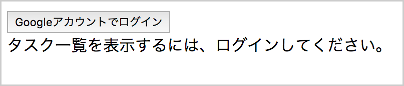
ログイン時。ユーザごとのタスクはまだありません。

以上で読み込みパスの変更ができました。
★次回の記事
★目次
